


Pattadar Details AP – Check Landholder & Land Record Information
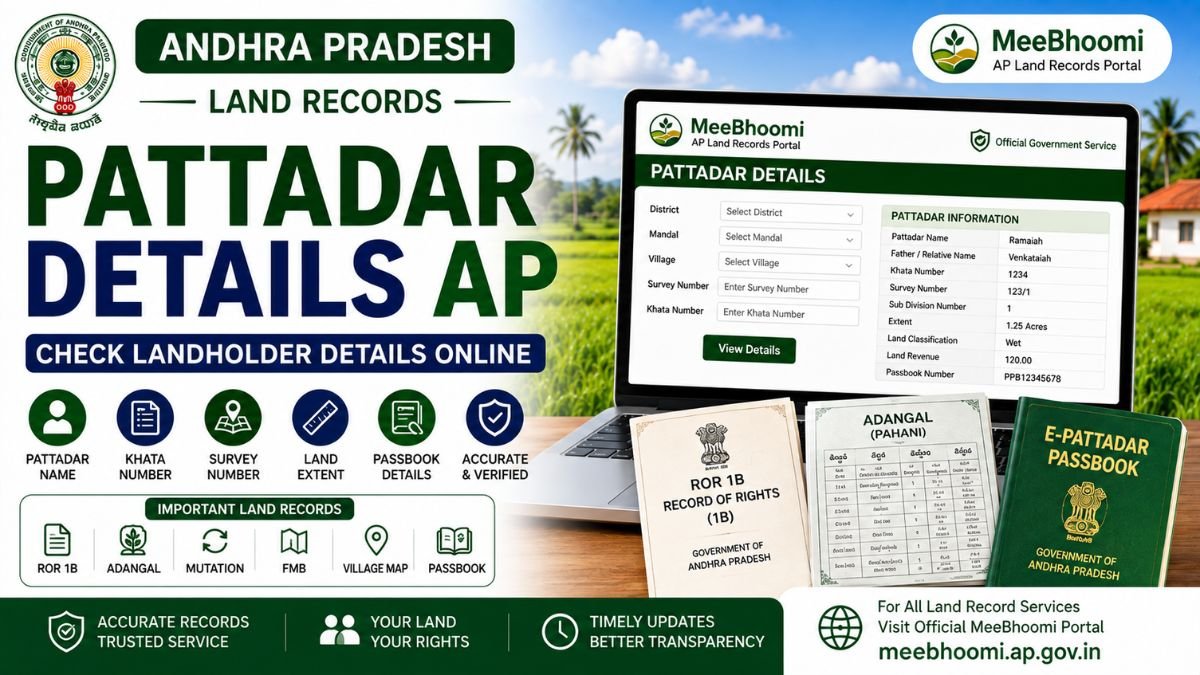
Pattadar Details AP refers to the landholder-related information recorded in the Andhra Pradesh Revenue land-record system. Depending on the service and record available, Pattadar information can be associated with details such as the Pattadar name, Khata Number, Survey Number, land extent and other Revenue-record particulars.
Pattadar-related services are connected with records such as ROR 1B, Adangal, Mutation and Electronic Pattadar Passbook. Andhra Pradesh government service documentation also lists services for Pattadar mobile-number seeding, mutation, e-Passbook replacement/duplicate and ROR 1B rectification.
What Are Pattadar Details?
A Pattadar is the person recorded in the applicable Revenue land records in relation to a land parcel.
Depending on the record and service, Pattadar-related information may include:
- Pattadar Name
- Father/Relative Name
- Khata Number
- Survey Number
- Land Extent
- Land Classification
- Revenue-record particulars
- Pattadar Passbook details
- Aadhaar/mobile seeding status, where applicable
The exact information available online depends on the current government record and service.
How to Check Pattadar Details in AP?
To check available Pattadar-related land information:
- Open the official MeeBhoomi AP portal.
- Select the applicable land-record service.
- Choose the required District, Mandal and Village.
- Enter the requested Survey Number, Khata Number or other details.
- Submit the information.
- Carefully verify the Pattadar and land details displayed.
If the required information is not available through the online service, use the applicable Revenue service through an authorised service centre.
What Details Should You Verify?
When checking Pattadar information, compare the available record with your documents.
Pay particular attention to:
- Pattadar Name
- Survey Number
- Sub-Division Number
- Khata Number
- Land Extent
- Land Classification
- Mutation Status
- Pattadar Passbook
- ROR 1B
- Adangal
Checking multiple records can help identify discrepancies before they become a larger problem.
Pattadar Details and ROR 1B
ROR 1B is an important Record of Rights document. It can contain information such as the Khatadar name, father’s name, Khata Number, Survey Number, land classification, extent and land revenue.
Therefore, if you are checking Pattadar information, ROR 1B can be an important record to compare.
Pattadar Details and Adangal
Adangal is a separate Revenue record that can contain land, cultivation and crop-related information.
A Pattadar’s name may appear in applicable Adangal records, but Adangal and ROR 1B are not the same document.
For better verification, compare the relevant records rather than relying on a single entry.
Pattadar Details After Land Purchase
If you have recently purchased land, the Pattadar information in Revenue records may not immediately reflect the transaction.
The applicable mutation process may need to be completed before updated particulars are reflected in the relevant Revenue records.
The AP government describes mutation as a process through which an owner’s name or other particulars may change following transactions such as a registered sale, inheritance, family division, pledge/release, court decree, government acquisition and certain other transactions.
After completing the applicable process, check the relevant Revenue records again.
Pattadar Mobile Number Seeding
Andhra Pradesh government service documentation specifically lists “Pattadar mobile number seeding in Land Records” as a Revenue-related service.
If your mobile number is not associated with the applicable land record, check the current official procedure for mobile-number seeding.
Do not enter personal information on unofficial websites claiming to provide Pattadar services.
Pattadar Passbook and Pattadar Details
The Electronic Pattadar Passbook (e-Passbook) is another important service connected with Pattadar records.
The AP government service catalogue includes:
- Mutation and Title Deed Cum Pattadar Passbook
- Replacement of Pattadar Passbook
- Duplicate Pattadar Passbook
- Printing of Title Deed Cum Pattadar Passbook
- ROR 1B rectification
The government service catalogue currently lists different service categories and SLAs for these services.
What If Pattadar Details Are Incorrect?
If you find an incorrect Pattadar name, land extent, Survey Number or other information:
- Compare the record with your registered documents.
- Check ROR 1B.
- Check Adangal.
- Verify mutation status.
- Check the Pattadar Passbook where applicable.
- Collect supporting documents.
- Approach the appropriate Revenue authority for the applicable correction process.
For serious ownership or title disputes, consult a qualified property lawyer.
Is Pattadar Information Proof of Ownership?
Pattadar information in Revenue records is important, but it should not automatically be treated as the sole conclusive proof of legal title.
For property verification, consider the complete set of relevant documents, including:
- Registered Sale Deed
- ROR 1B
- Adangal
- Mutation records
- FMB
- Pattadar Passbook
- Village Map
- Other applicable registered documents
Frequently Asked Questions
1. What are Pattadar Details in AP?
Pattadar Details are landholder-related particulars recorded in the applicable Andhra Pradesh Revenue land records.
2. How can I check Pattadar Details online?
Use the applicable official MeeBhoomi AP land-record service and enter the required District, Mandal, Village, Survey Number, Khata Number or other requested information.
3. Which records contain Pattadar information?
Depending on the record, Pattadar information may be associated with ROR 1B, Adangal, Mutation records and Pattadar Passbook/e-Passbook.
4. What if my Pattadar name is incorrect?
Compare the available Revenue records with your registered documents and approach the appropriate Revenue authority for the applicable correction process.
5. Does mutation update Pattadar Details?
An approved mutation can result in the applicable Revenue records being updated following a qualifying transaction or event. The exact process depends on the transaction and current government workflow.
6. Is Pattadar Details the same as legal ownership proof?
No. Pattadar information is an important Revenue record, but legal title should be assessed using the complete relevant documentation.
Official Sources
MeeBhoomi AP – Official Land Records Portal
AP Gram/Ward Secretariat – Government Service Information
The AP government service documentation lists Pattadar-related services including mobile-number seeding, mutation, e-Passbook services and ROR 1B rectification.
Disclaimer
MeeBhoomiAP.org is an independent informational website and is not affiliated with or operated by the Government of Andhra Pradesh.
Government services, procedures, fees, processing times and portal features may change. Always verify the latest information through the official government portal or an authorised service centre.
This article provides general information and is not legal advice.