


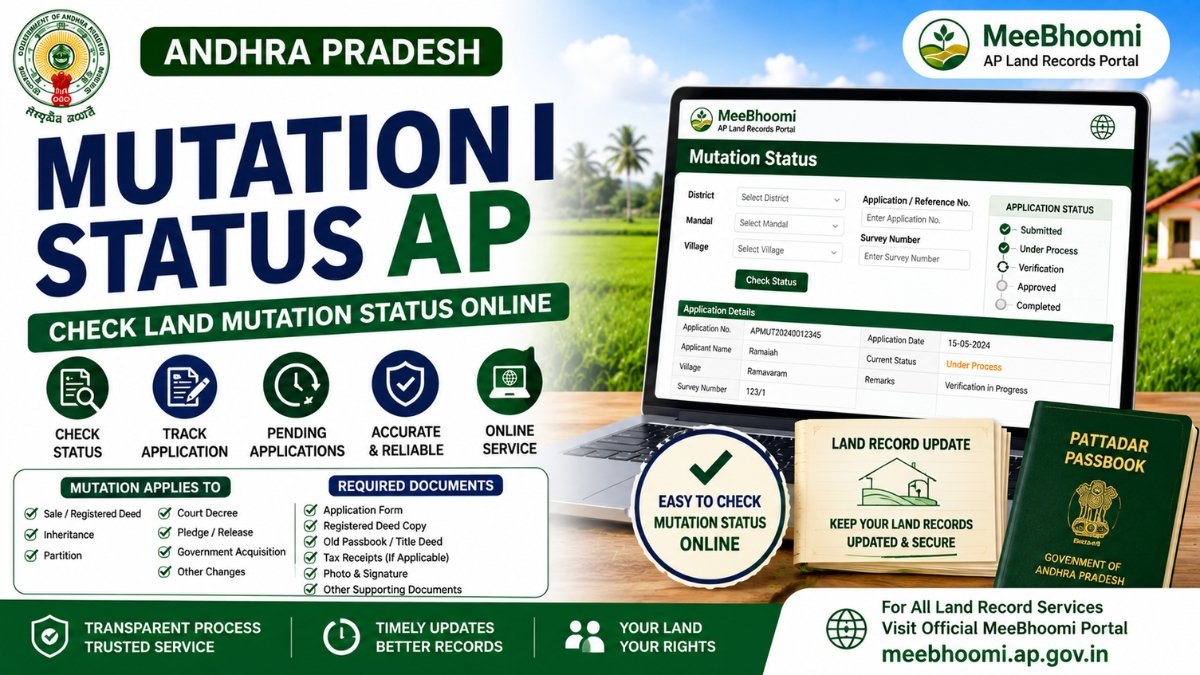
Mutation Status AP – Check Land Mutation Status Online
Mutation Status AP helps landowners check whether a land-record mutation related to a property transaction has been completed, is pending, or requires further action.
In Andhra Pradesh, mutation is the process of updating the owner’s name or other relevant particulars in Revenue records after transactions or events such as a registered sale, inheritance, family partition, court decree, pledge/release and certain other changes. The AP government service manual specifically lists these situations as mutation-related transactions.
If you have recently purchased, inherited or transferred land, checking the mutation status can help you determine whether the corresponding Revenue-record update has been completed.
What Is Land Mutation?
Mutation is the process of recording an applicable change in ownership or other land particulars in the Revenue records.
Mutation may arise from:
- Registered sale
- Inheritance after the death of an owner
- Family partition
- Pledge or release
- Court decree
- Land-use conversion/alienation
- Government acquisition
- Certain government land grants
These transaction types are identified in the Andhra Pradesh Revenue Department’s service documentation.
How to Check Mutation Status in AP?
The exact online status-check facility can depend on the current government portal and service workflow.
For an existing mutation application, keep your application/reference number and land details ready and use the applicable official Revenue service.
You may need information such as:
- District
- Mandal
- Village
- Survey Number
- Khata Number
- Application/Reference Number
If an online status option is not available for your particular application, contact the authorised MeeSeva/GSWS centre or concerned Revenue authority.
What Does Mutation Status Mean?
Depending on the service workflow, your application may show a status indicating that it is:
- Submitted – Application has been received.
- Under Process – Verification or processing is ongoing.
- Approved – Mutation has been approved.
- Rejected – Application was not approved.
- Pending for Verification – Additional verification may be required.
The exact status labels can vary according to the current system.
Mutation After Land Purchase
After purchasing land through a registered transaction, the Revenue records may need to be updated to reflect the applicable change.
The AP government documentation identifies J-Slip/sale through a registered deed as one of the mutation transaction types.
After the transaction, verify the relevant Revenue records and make sure the updated particulars are reflected correctly.
Documents for Mutation
The current AP government service manual lists documents including:
- Application Form
- Registered Document Copies
- Old Pattadar Passbook/Title Deed
- Tax Receipts, where applicable
- Recent Passport-size photograph
- Signature
- NRI proof, where applicable
Document requirements can vary depending on the transaction and service, so check the latest official requirements before applying.
How Long Does Mutation Take?
The AP government service manual currently lists a 30-day SLA for the applicable Mutation and Title Deed Cum Pattadar Passbook service.
However, actual processing can depend on document verification, the nature of the transaction and the applicable Revenue workflow.
Mutation Status vs ROR 1B
These are different concepts.
Mutation Status tells you about the progress/result of the applicable mutation process.
ROR 1B is a Revenue record containing Record of Rights information.
After a successful mutation, relevant land records may need to be checked to confirm that the updated particulars are correctly reflected.
What If Mutation Is Still Pending?
If your mutation remains pending:
- Check the application/reference number.
- Verify whether additional documents are required.
- Check the status through the applicable official service.
- Contact the authorised MeeSeva/GSWS centre if necessary.
- Approach the concerned Revenue authority for clarification if the delay continues.
Keep your application acknowledgement and supporting documents safely.
What If Mutation Is Rejected?
If a mutation application is rejected, first identify the reason mentioned by the competent authority.
Depending on the issue, you may need to:
- Correct missing information.
- Submit additional documents.
- Clarify discrepancies in land records.
- Follow the applicable correction/re-application procedure.
For ownership or title disputes, obtain professional legal advice rather than relying only on an online status.
Important Land Records to Check After Mutation
After mutation, it is useful to compare the applicable records, including:
| Land Record | Purpose |
|---|---|
| Mutation Status | Tracks the mutation process |
| ROR 1B | Record of Rights information |
| Adangal | Revenue/cultivation-related information |
| FMB Sketch | Field measurements and survey sketch |
| E-Passbook | Pattadar Passbook-related information |
| Registered Deed | Transaction/title document |
Frequently Asked Questions
1. What is Mutation Status AP?
Mutation Status AP indicates the progress or outcome of an applicable land-record mutation process in Andhra Pradesh.
2. Why is mutation required after buying land?
Mutation updates the applicable Revenue records after a transaction such as a registered sale. It is separate from the registration of the transaction itself.
3. How can I check my mutation status?
Use the applicable official Andhra Pradesh Revenue service with your application/reference details. If an online status option is unavailable, contact the authorised MeeSeva/GSWS centre.
4. How long does AP land mutation take?
The AP government service manual currently specifies a 30-day SLA for the applicable Mutation and Title Deed Cum Pattadar Passbook service.
5. What documents are needed for mutation?
Requirements can include the application form, registered document copies, old Pattadar Passbook/Title Deed and other supporting documents depending on the transaction.
6. Does mutation prove legal ownership?
Mutation is a Revenue-record process and should not by itself be treated as conclusive proof of legal title. For title disputes or property transactions, examine the complete document history and obtain appropriate legal advice.
Official Sources
MeeBhoomi AP – Official Land Records Portal
AP Government – Mutation & Title Deed Cum Pattadar Passbook Service Manual
Disclaimer
MeeBhoomiAP.org is an independent informational website and is not affiliated with or operated by the Government of Andhra Pradesh.
Government services, procedures, fees, status options and processing requirements may change. Always verify the latest information through the official government portal or an authorised service centre.
This article provides general information and is not legal advice.